
This document will show the various ways a prospective buyer can request a Model Center appointment:
Web-Based Form Submission:
- A buyer can visit our website and request an appointment via our Schedule an Appointment Page. This will result in a submission of the Virtual Appointment Request Form.
- A notification will then be sent to our Sales Representatives for that Office.
- A task will be generated to schedule the appointment:
- First, it will check if that contact already has a contact owner. If so, it will assign the task to that contact owner.
- If there is no contact owner, it will remain unassigned and be placed in the shared task queue for that office (i.e. Copper River, Belterra, Estates)
- Our Sales Representatives will complete the task by reaching out to the perspective buyer
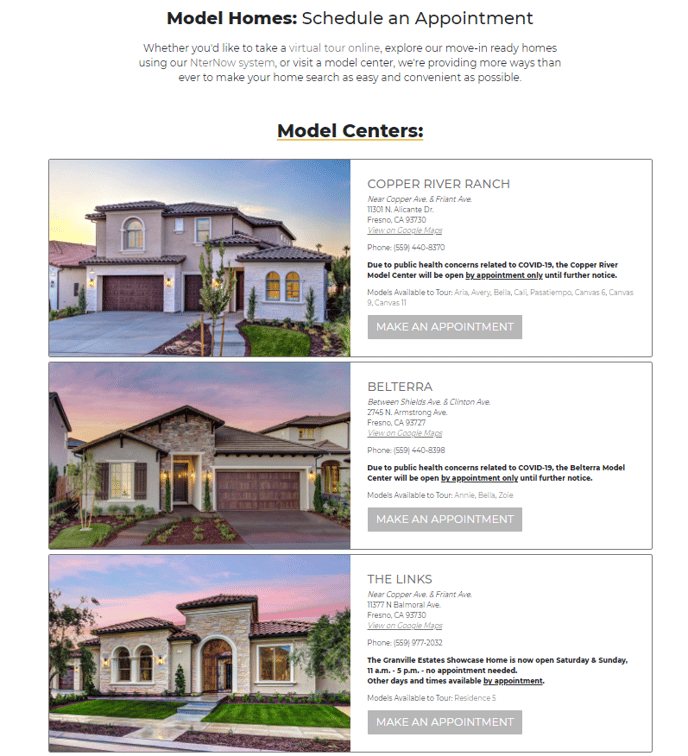
Here is a link to a quick video showing the process our buyers will go through to submit our Web-Based Appointment Request:
QR Code Form Submission:
- A visitor who comes to our Sales Offices while the office is closed (outside of normal business hours or while our representatives are away from the office) can still schedule a Model Center Appointment Request.
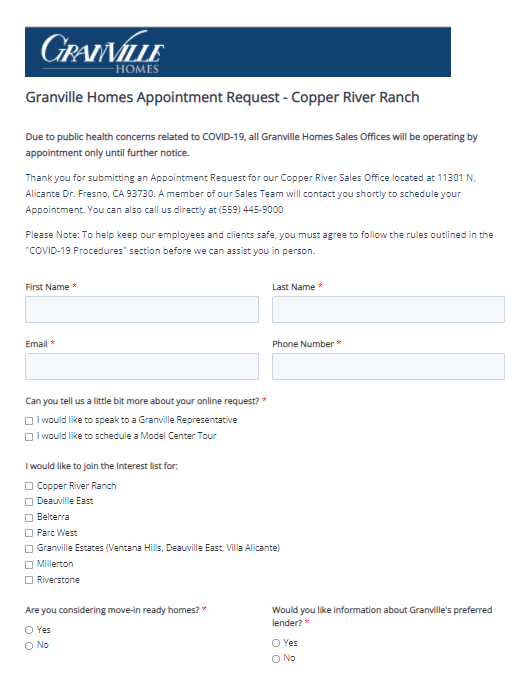
- When they scan the QR Code they will see our Model Center Appointment Request Form as shown below:
- A notification will then be sent to our Sales Representatives for that Office.
- A task will be generated to schedule the appointment:
- First, it will check if that contact already has a contact owner. If so, it will assign the task to that contact owner.
- If there is no contact owner, it will remain unassigned and be placed in the shared task queue for that office (i.e. Copper River, Belterra, Estates)
- Our Sales Representatives will complete the task by reaching out to the perspective buyer